Usage
How does it work
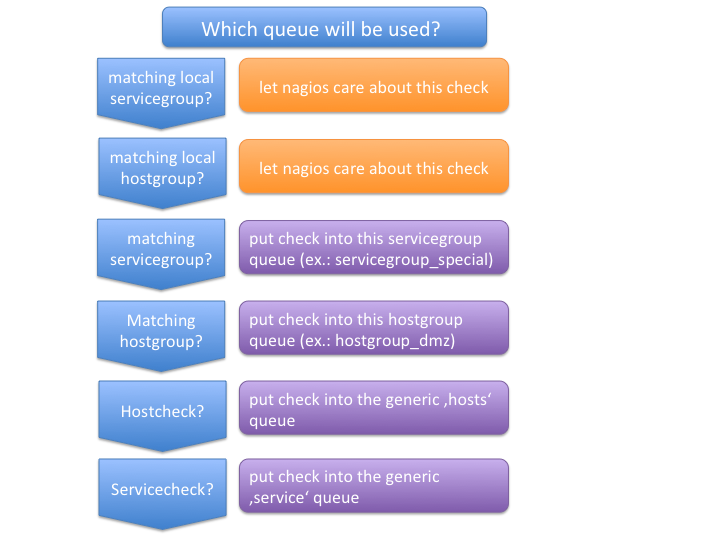
When the Mod-Gearman broker module is loaded, it intercepts all service checks, host checks and event handler events. Event handlers are then sent to a generic ’eventhandler’ queue. Checks for hosts that are in one of the specified hostgroups are sent to a separate hostgroup queue. All non-matching hosts are sent to a generic ‘hosts’ queue. Checks for services are first checked against the list of servicegroups, then against the hostgroups and if none match, they will be sent into a generic ‘service’ queue. The NEB module starts a single thread that monitors the ‘check_results’ queue, where all results arrive.
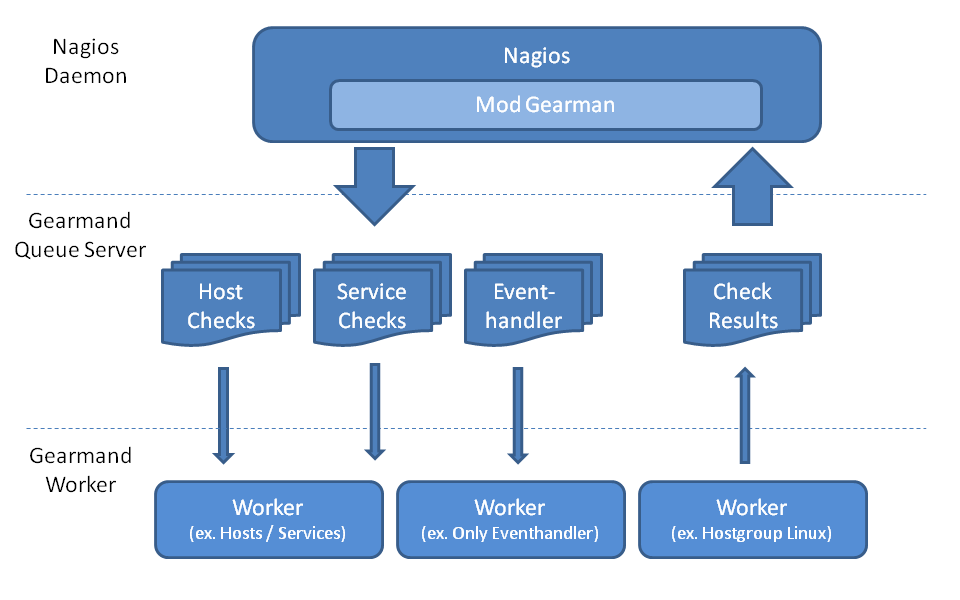
A simple set of queues would look like this:
| Queue Name | Worker Available | Jobs Waiting | Jobs Running |
|---|---|---|---|
| check_results | 1 | 0 | 0 |
| eventhandler | 50 | 0 | 0 |
| host | 50 | 0 | 1 |
| service | 50 | 0 | 13 |
There is one queue for the results and two for the checks plus the eventhandler queue.
The workflow is simple:
- Naemon wants to execute a service check.
- The check is intercepted by the Mod-Gearman NEB module.
- Mod-Gearman puts the job into the ‘service’ queue.
- A worker grabs the job and puts the result back into the ‘check_results’ queue
- Mod-Gearman grabs the result job and puts the result back onto the check result list
- The Naemon reaper reads all checks from the result list and updates hosts and services
You can assign hostgroups or servicegroups to dedicated workers. This example uses a separate hostgroup for Japan and a separate servicegroup for resource-intensive Selenium checks.
It would look like this:
| Queue Name | Worker Available | Jobs Waiting | Jobs Running |
|---|---|---|---|
| check_results | 1 | 0 | 0 |
| eventhandler | 50 | 0 | 0 |
| host | 50 | 0 | 1 |
| hostgroup_japan | 3 | 1 | 3 |
| service | 50 | 0 | 13 |
| servicegroup_selenium | 2 | 0 | 2 |
You still have the generic queues and in addition there are two queues for the specific groups.
The worker processes will take jobs from the queues and put the result back into the check_result queue which is then retrieved by the NEB module and returned to the Naemon core. A worker can work on one or more queues. So you could start a worker which only handles the ‘hostgroup_japan’ group, one worker for the ‘selenium’ checks, and one worker that covers the other queues. There can be more than one worker on each queue to share the load.
Common Scenarios
Load Balancing
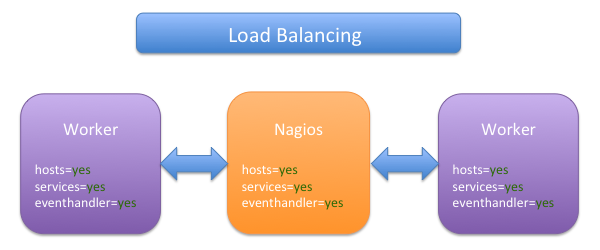
The simplest setup uses load balancing. For example, if your single Naemon box just cannot handle the load, you could just add a worker in the same network (or even on the same host) to reduce your load on the Naemon box. To do this, enable hosts, services and eventhandler on the server and the worker.
Pros:
- reduced load on your monitoring box
Cons:
- no failover
Distributed Monitoring
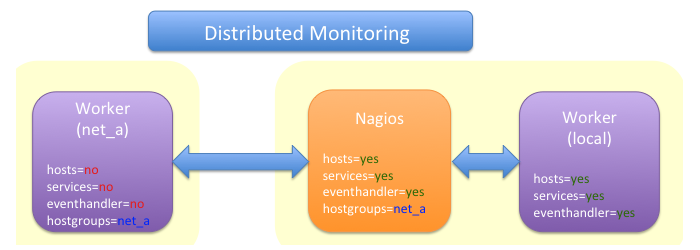
If your checks have to be run from different network segments, then you can use the hostgroups (or servicegroups) to define a hostgroup for a specific worker. The general hosts and services queues are disabled for this worker and just the hosts and services from the given hostgroup will be processed.
Pros:
- reduced load on your monitoring box
- ability to access remote networks
Cons:
- no failover
Distributed Monitoring with Load Balancing
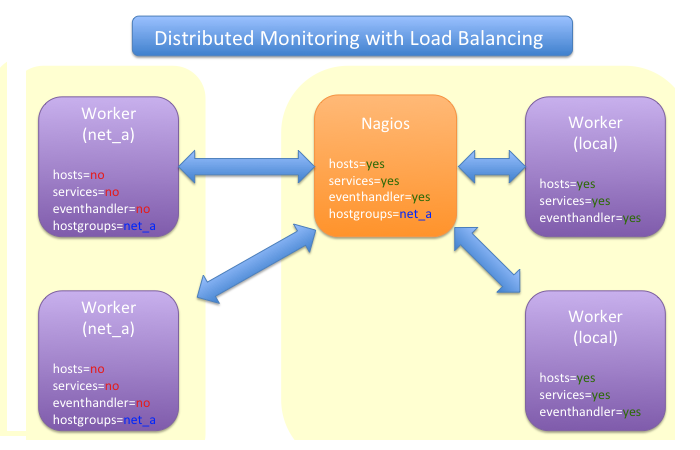
Your distributed setup could easily be extended to a load balanced setup by adding more workers with the same configuration.
Pros:
- reduced load on your monitoring box
- ability to access remote networks
- automatic failover and load balancing for workers
Cons:
- no failover for the master
NSCA Replacement
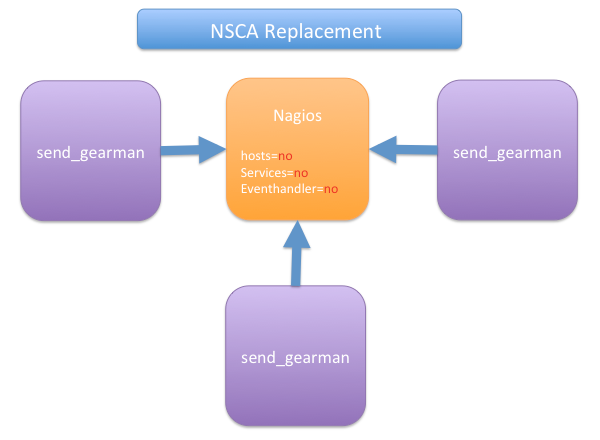
If you just want to replace a current NSCA solution, you could load the Mod-Gearman NEB module and disable all distribution features. The core can still receive passive results sent via send_gearman / send_multi. Make sure you use the same encryption settings as the NEB module or your core won’t be able to process the results or use the ‘accept_clear_results’ option.
Pros:
- easy to set up in existing environments
Distributed Setup With Remote Scheduler
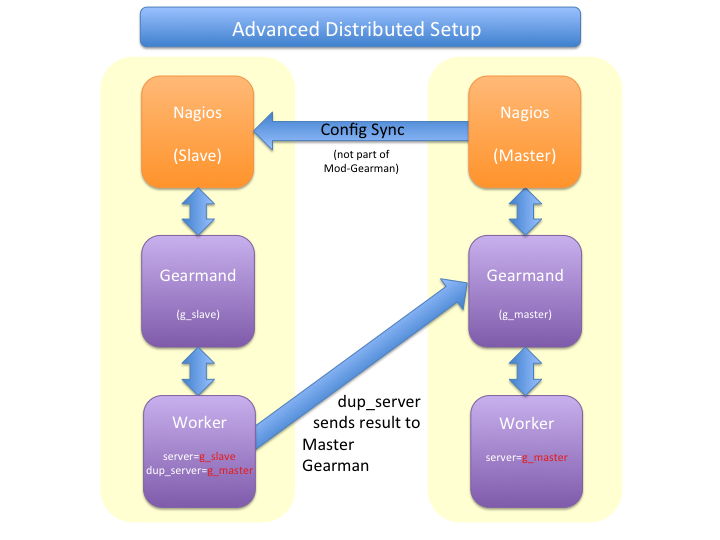
If your network is unstable, you need a GUI at the remote location, or you have another reason to run a remote core, this setup may be useful. It consists of 2 independent Mod-Gearman setups, and the slave workers send their results to the master via the ‘dup_server’ option. The master’s object configuration must contain all slave services and hosts. The configuration sync is not part of Mod-Gearman.
Pros:
- independent of network outages
- local view
Cons:
- more complex setup
- requires configuration sync
Gearman Proxy
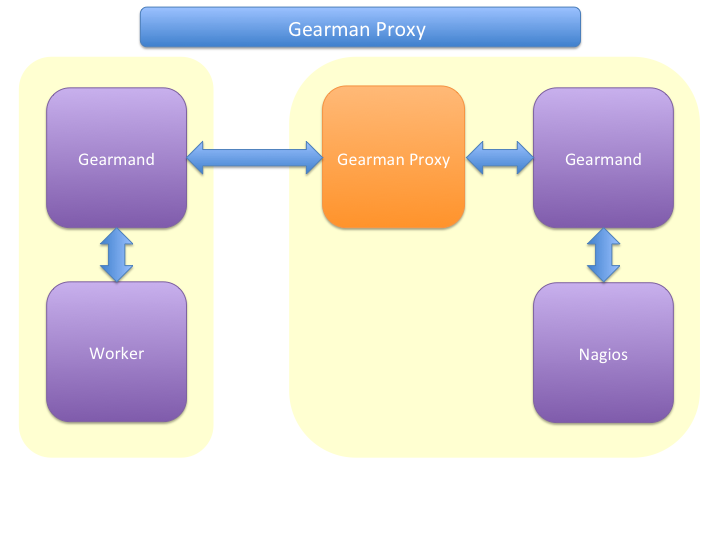
Sometimes you may need to reverse the direction of the initial connection attempt. Usually the worker and the NEB module open the initial connection so they need to access the gearmand port. In cases where no direct connection is possible, use an SSH tunnel or the Gearman proxy. The Gearman proxy just puts jobs from one gearmand into another gearmand and vice versa.
gearman_proxy.pl can be found here.
Pros:
- changes direction of initial connection setup
- buffers network outages
Cons:
- two more daemons to monitor and maintain
Installation
OMD
Using OMD is probably the easiest way of installing and using Mod-Gearman. You just have to run ‘omd config’ or set Mod-Gearman to ‘on’.
OMD is available for Debian, Ubuntu, CentOS/Red Hat and SLES.
OMD[test]:~$ omd config set MOD_GEARMAN on
Configuration
All config parameters for Mod-Gearman can be found here.
Queue Names
You may want to watch your gearman server job queue. The shipped gearman_top does this. It polls the gearman server every second and displays the current queue statistics.
| Name | Worker | Avail | Queue | Running |
|---|---|---|---|---|
| check_results | 1 | 1 | 0 | 0 |
| host | 3 | 3 | 0 | 0 |
| service | 3 | 3 | 0 | 0 |
| eventhandler | 3 | 3 | 0 | 0 |
| servicegroup_jmx4perl | 3 | 3 | 0 | 0 |
| hostgroup_japan | 3 | 3 | 0 | 0 |
check_results
This queue is monitored by the NEB module to fetch results from the workers. You don’t need an extra worker for this queue. The number of result workers can be set to a maximum of 256, but usually one is enough. One worker is capable of processing several thousand results per second.
host
This is the queue for generic host checks when you enable host checks with the hosts=yes switch. Before a host goes into this queue, it is checked to see whether any local group or separate hostgroup matches. If nothing matches, then this queue is used.
service
This is the queue for generic service checks when you enable service
checks with the services=yes switch. Before a service goes into this
queue it is checked against the local hostgroups and servicegroups. Then
the normal hostgroups and servicegroups are checked and if none match,
this queue is used.
hostgroup_<name>
This queue is created for every hostgroup which has been defined by
the hostgroups=… option. Make sure you have at least one worker for
every hostgroup you specify. Start the worker with --hostgroups=...
to work on hostgroup queues. Note that this queue may also contain
service checks if the hostgroup of a service matches.
servicegroup_<name>
This queue is created for every servicegroup which has been defined by
the servicegroup=... option.
eventhandler
This is the generic queue for all event handlers. Make sure you have a
worker for this queue if you have event handlers enabled. Start the
worker with --events to work on this queue.
perfdata
This is the generic queue for all performance data. It is created and
used if you switch on --perfdata=yes. Performance data cannot be
processed by the gearman worker itself. You will need PNP4Nagios (it’s also included in OMD).
Performance
While the main motivation was to ease distributed configuration, this plugin also helps to spread the load across multiple workers. Throughput is mainly limited by the number of jobs a single Naemon instance can put onto the Gearman job server. Keep the Gearman job server close to the Naemon box. Best practice is to put both on the same machine. Both processes will utilize one core. Some testing with my workstation (Dual Core 2.50GHz) and two worker boxes gave me these results. I used a sample Nagios installation with 20.000 services at a 1 minute interval and a sample plugin which returns just a single line of output. I got over 300 service checks per second, which means you could easily set up 100.000 services at a 5 minute interval with a single Nagios box. The number of worker boxes depends on your check types.
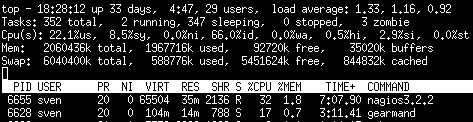
Load in top
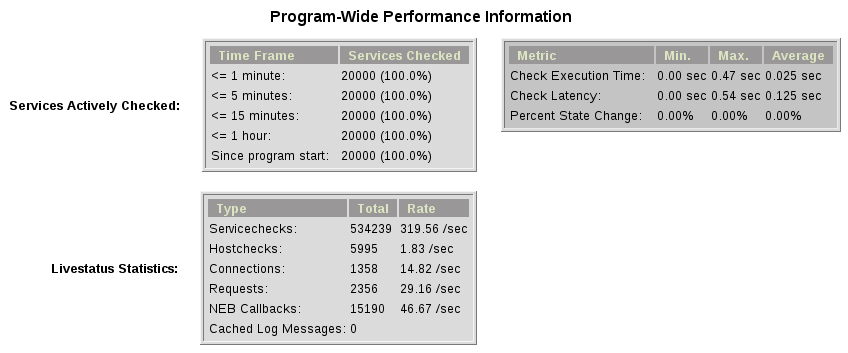
Overview in Thruk
Exports
The export feature sends data structures from the Naemon core as JSON data. For each configurable event one job will be created. At the moment, the only useful event type is the logdata event which allows you to create a JSON data job for every logged line. This can be very useful for external reporting tools.
exports
Set the queue name to create the jobs in. The return code will be sent back to the core (Not all callbacks support return codes). Callbacks are a list of callbacks for which you want to export json data.
export=<queue>:<returncode>:<callback>[,<callback>,...]
export=log_queue:1:NEBCALLBACK_LOG_DATA
Embedded Perl
Since 1.2.0 Mod-Gearman has built-in embedded Perl support, which generally provides a big performance boost when you have lots of Perl plugins.
To enable embedded Perl you need to run configure with –enable-embedded-perl
$ ./configure --enable-embedded-perl otheroptions...
The --with-perlcache configure option has been replaced by a runtime configuration option use_perl_cache.
NOTE: Not all Perl plugins support EPN. You can fix them, add ‘# naemon: -epn’ in the first 10 lines of the script or set ‘use_embedded_perl_implicitly=off’ so all scripts without the explicit tag are run without embedded Perl.
The default configuration of Mod-Gearman enables embedded Perl, but only uses it for Perl scripts which explicitly set ‘# naemon: +epn’. This is a very safe way of using embedded Perl but you probably miss some plugins that do not set the header but would still run with EPN. You may want to use the ‘mini_epn’ from your Naemon installation to verify if a plugin works with EPN or not.
General EPN documentation is valid for Mod-Gearman as well:
NOTE: Mod-Gearman does not fix all of the memory leaks introduced with Naemon and Embedded Perl, but it moves the leaks away from the core. And they do not affect Mod-Gearman at all, as they are only in the preforked worker processes which will be restarted automatically from time to time (see ‘max-jobs’).
How To
How to Monitor Job Server and Worker
Use the supplied check_gearman to monitor your workers and job server. Workers have their own queue for status requests.
$ ./check_gearman -H <job server hostname> -q worker_<worker hostname> -t 10 -s check
check_gearman OK - localhost has 10 worker and is working on 1 jobs|worker=10 running=1 total_jobs_done=1508
This will send a test job to the given job server and the worker will respond with some statistical data.
The job server can be monitored with:
$ ./check_gearman -H localhost -t 20
check_gearman OK - 6 jobs running and 0 jobs waiting.|check_results=0;0;1;10;100 host=0;0;9;10;100 service=0;6;9;10;100
How to Submit Passive Checks
You can use send_gearman to submit active and passive checks to a Gearman job server, where they are processed like completed checks.
$ ./send_gearman --server=<job server> --encryption=no --host="<hostname>" --service="<service>" --message="message"
How to build send_gearman.exe
After installing Strawberry Perl, you need to install the ‘PAR::Packer’ module and run pp:
$ pp -l zlib1__.dll -l ssleay32__.dll -l libeay32__.dll -x -z 9 -o send_gearman.exe send_gearman.pl
How to Submit check_multi Results
check_multi is a plugin which executes multiple child checks.
You can pass such child checks to Naemon via the mod_gearman NEB module:
$ check_multi -f multi.cmd -r 256 | ./send_multi --server=<job server> --encryption=no --host="<hostname>" --service="<service>"
If you want to use only check_multi and no other workers, you can achieve this with the following NEB module settings:
broker_module=/usr/local/share/naemon/mod_gearman_naemon.o server=localhost encryption=no eventhandler=no hosts=no services=no hostgroups=does_not_exist config=.../module.conf
NOTE: encryption is not necessary if you run both the check_multi checks and the Naemon check_results queue on the same server.
How to Set Queue by Custom Variable
Set ‘queue_custom_variable=worker’ in your Mod-Gearman NEB configuration. Then adjust your Naemon host/service configuration and add the custom variable:
  define host {
    ...
    _WORKER    hostgroup_test
  }
The test hostgroup does not have to exist; it is a virtual queue name which is used by the worker.
Adjust your Mod-Gearman worker configuration and put ’test’ in the ‘hostgroups’ attribute. From then on, the worker will work on all jobs in the ‘hostgroup_test’ queue.
Notifications
Starting with version 3.0.2, Mod-Gearman distributes notifications as well. All notifications (except those bypassed by local groups) are sent to the notifications queue and processed there.
Mod-Gearman does not support environment macros, except for two plugin output related ones.
It does set
- NAGIOS_SERVICEOUTPUT
- NAGIOS_LONGSERVICEOUTPUT
for service notifications and
- NAGIOS_HOSTOUTPUT
- NAGIOS_LONGHOSTOUTPUT
for host notifications.
Hints
- Make sure you have at least one worker for every queue. You should monitor that (check_gearman).
- Add log file checks for your gearmand server and mod_gearman worker.
- Make sure all gearman checks are in local groups. Gearman self checks should not be monitored through gearman.
- Checks which write directly to the Naemon command file (ex.: check_mk) have to run on a local worker or have to be excluded by the localservicegroups.
- Keep the gearmand server close to Naemon for better performance.
- If you have some checks which should not run in parallel, just set up a single worker with –max-worker=1 and they will be executed one after another. For example, use this for CPU-intensive checks with Selenium.
- Make sure all your workers have the Monitoring-Plugins available under the same path. Otherwise, the workers will not be able to find them.