HTML Notifications
Notifications
Notifications are part of every standard monitoring installation. But OMD makes it very easy to customize the layout of your email notifications by using templates.
By default, you will have the 2 standard notification templates in your site folder at:
    OMD[site]:~$ ls -la etc/mail-templates/
    total 12
    drwxr-xr-x 1 site site  166 Mar 30 14:37 ./
    drwxr-xr-x 1 site site  754 Mar 26 14:21 ../
    -rw-r--r-- 1 site site  867 Jun 12  2014 notify-by-email.host.tpl
    -rw-r--r-- 1 site site  937 Jun 12  2014 notify-by-email.service.tpl
with the corresponding commands host-notify-by-email and service-notify-by-email defined in etc/nagios/conf.d/notification_commands.cfg
If you just want to change the default layout of your email notifications, just edit the templates at the path above.
HTML E-Mail Notifications
Starting with OMD 2.20, the HTML email commands and templates are included and can be used directly by assigning the host- and service-notify-by-email-html commands.
To send HTML emails, we need to add a template for HTML emails and create two new commands. The changed parts are bold.
define command {
    command_name service-notify-by-email-html
    command_line /usr/bin/perl $USER1$/notify-by-email.pl \
        --template=$USER4$/etc/mail-templates/notify-by-email.service.html.tpl \
        --mail=/usr/sbin/sendmail \
        -o BASEURL="http://`hostname -f`/$USER3$/" \
        -o NOTIFICATIONTYPE='$NOTIFICATIONTYPE$' \
        -o NOTIFICATIONCOMMENT='$NOTIFICATIONCOMMENT$' \
        -o HOSTNAME='$HOSTNAME$' \
        -o HOSTALIAS='$HOSTALIAS$' \
        -o HOSTSTATE='$HOSTSTATE$' \
        -o CONTACTEMAIL='$CONTACTEMAIL$' \
        -o HOSTADDRESS='$HOSTADDRESS$' \
        -o SHORTDATETIME='$SHORTDATETIME$' \
        -o SERVICEDESC='$SERVICEDESC$' \
        -o SERVICESTATE='$SERVICESTATE$' \
        -o SERVICEOUTPUT='$SERVICEOUTPUT$' \
        -o LONGSERVICEOUTPUT='$LONGSERVICEOUTPUT$' \
        -o SERVICEPERFDATA='$SERVICEPERFDATA$' \
        -o ACKAUTHOR='$SERVICEACKAUTHOR$' \
        -o ACKCOMMENT='$SERVICEACKCOMMENT$' \
        -o DURATION='$SERVICEDURATION$' \
        -o SERVICEEVENTID='$SERVICEEVENTID$' \
        -o LASTSERVICEEVENTID='$LASTSERVICEEVENTID$'
}
It is important to use /usr/sbin/sendmail as the mailer; otherwise you will get errors likeIgnoring header field "MIME-Version: 1.0".
Now do the same for the host command.
The last step is to configure your contacts to use the new HTML commands.
You can also download the prepared files:
cd ~/etc/mail-templates/ && wget https://labs.consol.de/omd/data/notify-by-email.host.html.tpl
cd ~/etc/mail-templates/ && wget https://labs.consol.de/omd/data/notify-by-email.service.html.tpl
cd ~/etc/nagios/conf.d   && wget https://labs.consol.de/omd/data/notification_commands_html.cfg
Troubleshooting
If it doesn’t work as expected, make sure you:
have /usr/sbin/sendmail installed
have configured the HTML commands for your contact
try to run the command manually:
  ./lib/nagios/plugins/notify-by-email.pl \
          --template=etc/mail-templates/notify-by-email.service.html.tpl \
          --mail=/usr/sbin/sendmail \
          --verbose \
          -o CONTACTEMAIL='your@email.com'
Of course you need to insert a valid email address.
Result
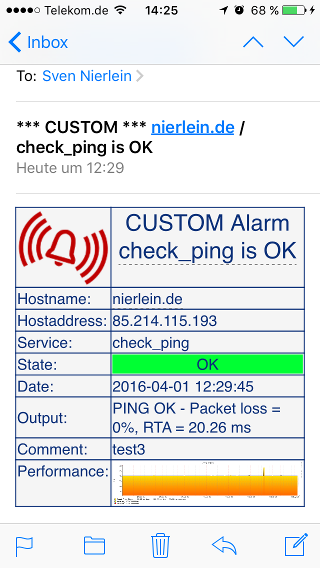
If everything worked, you should receive notifications in HTML format including the PNP performance graphs.